AWS CDK - Building Cloud Infrastructure as Code🧑💻
15 Sep, 2024 · 8 min read
"Getting started with AWS CDK: commands you need to know to deploy cloud resources"
👉 Quick Intro 🔥
- There are many ways to create resources in AWS like
- AWS Management Console
- AWS CLI
- AWS Software Development Kit (AWS SDK)
- AWS Cloud Development Kit (CDK)
- Terraform
- many more…
- You should know AWS CloudFormation before going ahead
- AWS CDK is framework for defining cloud infrastructure as code using familiar programming languages like Python, TypeScript, JavaScript, Java, C#
- It includes CLI interface for creating, managing, & deploying resources
Let’s dive in! ➡️
👉 AWS CDK vs SDK vs Terraform 📃
AWS CDK
- What? Framework for defining AWS infrastructure as code
- How? Write code to define resources, managed by AWS
- Use? Integrates AWS services into applications
- Languages? Python, JavaScript, TypeScript, Java, C#
- Integration? Generates CloudFormation template for deployment
AWS SDK
- What? Libraries or packages for various languages like boto3 for Python
- How? Code-based API calls to AWS services
- Use? Define and manage AWS infrastructure with high-level constructs
- Languages? Python, JavaScript, TypeScript, Java
- Integration? Direct API interaction with AWS services
Terraform
- What? Open-source tool for infrastructure as code
- How? Write code to describe and manage infrastructure
- Use? Multi-cloud infrastructure management support
- Languages? HashiCorp Configuration Language (HCL)
- Integration? Works with multiple clouds like AWS, Azure, GCP
Note:- If you are using AWS for resources and you want separate code for infrastructure management then go for AWS CDK
👉 Cloud Development Kit (CDK) 🤖
- In this blog, we’ll break down AWS CDK using a pizza restaurant analogy. Ready to cook up some epic cloud infrastructure ?
- Setting up a pizza outlet, is kinda like setting up cloud infrastructure with AWS CDK. Your kitchen resources (cloud resources), prepping the ingredients (cloud services) and serving up the delicious pizza (application)
- With AWS CDK, instead of fiddling with AWS management console for every little thing, you’re coding in languages you already know to define cloud resources.
Cool, right ? 😎
👉 Setup CDK Project ⚙️
-
Install CDK & pre-requisites
- Install AWS CLI by following this AWS CLI Installation Guide
- Install NodeJS, as AWS CDK uses NodeJS in the backend
- Install Python if you are using Python for CDK coding
- Install CDK as a global npm package
npm install -g cdk - Check the version
cdk --version
-
Setting up project (pizza outlet)
- Before you serve those cheesy pizzas, you need to get your kitchen ready 🧑🍳
- In AWS CDK, the kitchen is your project workspace where you code your cloud setup
- I will be referring to CDK with python in this blog
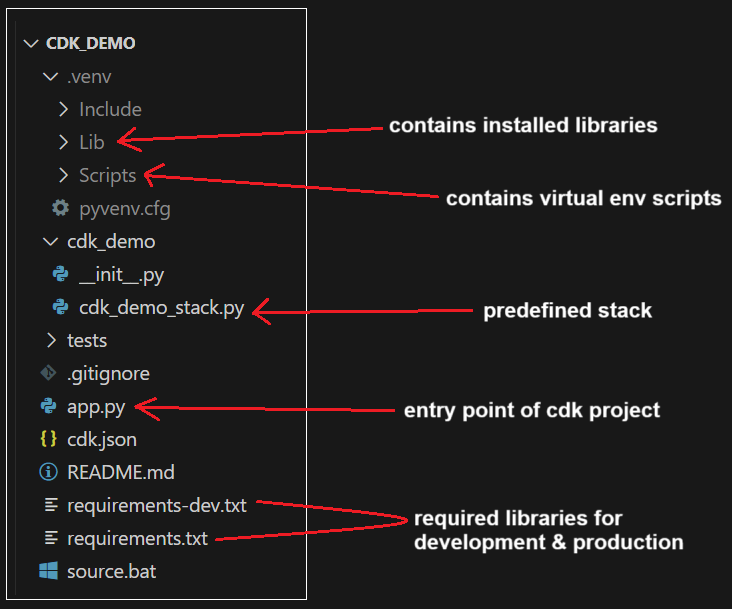
- To create the project, make a new folder. Inside it, use the command below and specify the language you will use for coding resources
cdk init --language python
-
Install dependencies (libraries)
As I am referring python, so I will install libraries using pip
pip install -r requirements.txt
👉 CDK CLI Commands 💻
-
Creating project (pizza outlet)
- We already saw creating CDK project above
cdk init --language python
- We already saw creating CDK project above
-
Needed resources (stock your kitchen)
- This step is done only for the first-time setup
- Now the kitchen is ready, but you need to stock it with all the essentials like the oven and utensils
- The command below will prepare your AWS account with all the necessary resources CDK needs to deploy
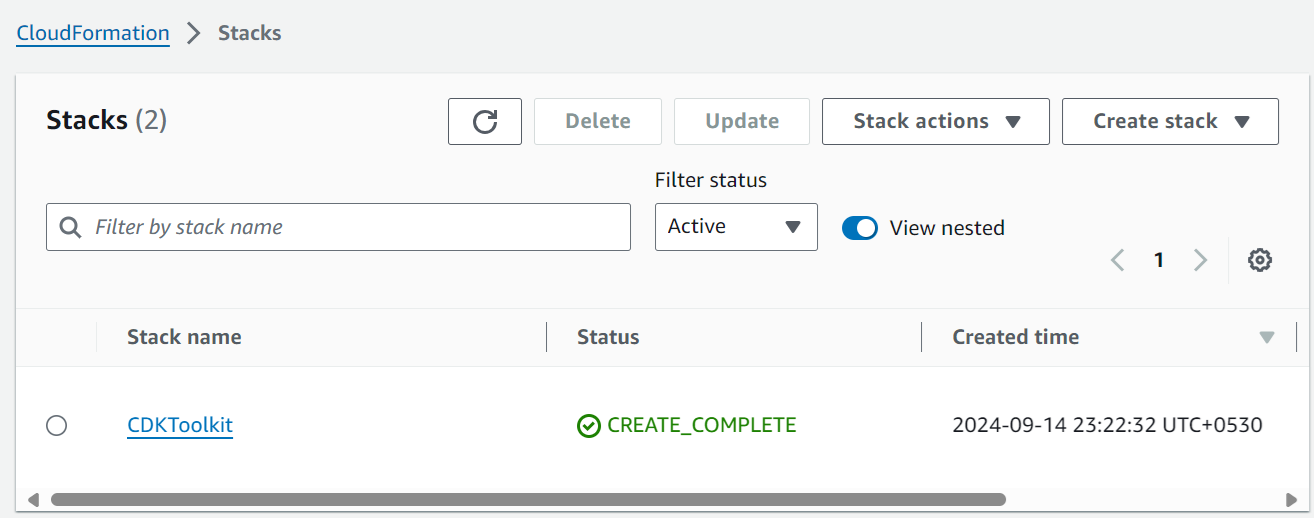
cdk bootstrap - This command sets up your AWS account with the S3 buckets, roles, and permissions needed for CDK. These resources are created through the bootstrap stack - CloudFormation template, which has default name CDKToolkit
-
Verify everything (check the recipe)
- Before you start cooking, you need to check the recipe 📃
- In CDK, the recipe is a CloudFormation template that tells AWS what to do
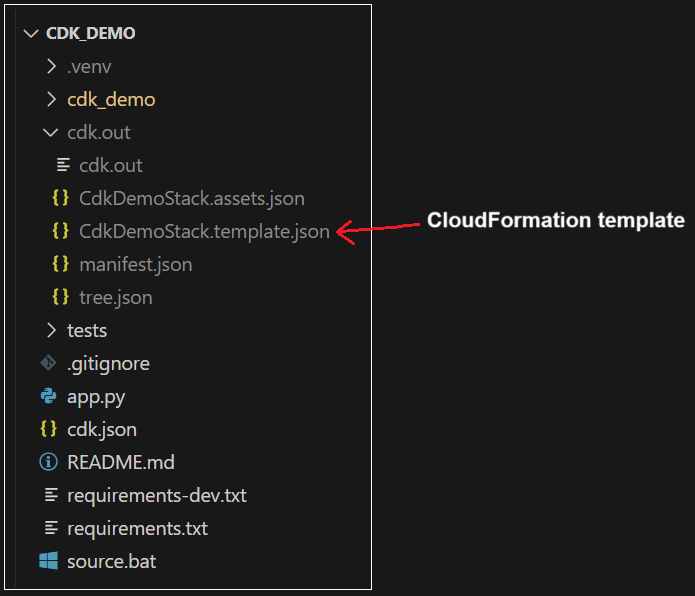
- The AWS CDK project is converted into a CloudFormation template using the below command. The template is stored in a new folder called cdk.out at the root level
cdk synth
cdk synth <stack_name> - If the code is correct, this command will succeed; otherwise, it will give an error
-
Push the template (serve the pizza)
- Time to cook and serve those cheesy pizzas! 🍕
- Below is the command where magic happens. It takes your CloudFormation template (recipe) and sets up the cloud resources in AWS (pizzas in oven) and get things rolling 🚀
cdk deploy
cdk deploy <stack_name>
cdk deploy --all - Your cloud infrastructure is live - like serving up fresh, hot pizzas to your customers! 👋
-
Check for changes (menu changes)
- Thinking of adding new pizza to the menu ? 🤔
- Before making changes, it’s smart to compare old and new menus just like the below command which compares your current deployed infrastructure with the changes you made in code
cdk diff
cdk diff <stack_name> - You’ll see a detailed list of changes, so you know exactly what’s different 🧐
-
Overview (checkout your restaurant)
- Want to see a quick overview of your pizza restaurant setup ? 🤔
- Below command helps you see all the different stacks (or outlet branches) you have got running
cdk ls
cdk ls <stack_name> - It will list all the stacks in your CDK app, it is like looking at map of all your restaurant branches 📝
-
Remove everything (closing time)
- All the good things must come to an end! 🏴
- When you’re done with your cloud infrastructure and want to clean up, it’s time to delete all the resources (shut down the kitchen). You can do this using the command below, which ensures everything gets cleaned up, leaving no traces behind
cdk destroy
cdk destroy <stack_name> - As of now, except S3 buckets everything gets deleted in the stack on destroy
👉 CDK Architecture 📝

👉 Constructs 🔗
- Basic building blocks of AWS CDK applications, categorized into three levels
- Each level offers an increasing level of abstraction
- The higher the abstraction, the less configuration required, meaning less expertise is needed, and vice-versa
- In simple terms, constructs are classes available in libraries for each resource. Some resources may not have all levels of constructs available yet
👉 Constructs Levels 🔢
-
L1 Construct (Low-level)
- Also known as CFN resources, these are the lowest level of constructs and offer no abstraction
- They require the most configuration and the highest level of expertise
- Think of them as your raw ingredients—flour, cheese, tomatoes needed for pizza 🧀🍅🍕
- They map directly to CloudFormation resources and are very flexible, but you have to do a lot of work yourself. These constructs are named starting with
Cfn - Example: CfnFunction for lambda, CfnBucket for S3\
-
L2 Construct (Mid-level)
- Also known as curated constructs, these are a widely used type
- They map directly to CloudFormation resources like L1, but offer a higher level of abstraction and provide helper methods for easier and faster configuration
- These are like pre-made pizza dough, ready-made pizza sauce, or shredded cheese—some of the hard work is already done 🧑🍳
- Example: Function for lambda, Bucket for S3
-
L3 Construct (High-level)
- Also known as patterns, with highest level of abstraction
- Each L3 construct can contain collection of resources that are configured to work together to accomplish a specific task or service within your application
- These are like pre-made pizzas which are dried and packaged, - you just have to oven it and eat 🍕🔥
- Example: PythonFunction for lambda, NodejsFunction for lambda
👉 Stack 🗄️
-
An AWS CDK stack is a collection of one or more constructs that define AWS resources
-
Each CDK stack represents a CloudFormation stack in your CDK app
-
When you run
cdk init, you get only one stack by default in your app, but now we will create two stacks in separate files1# Stack 1 - s3_stack.py 2 3from aws_cdk import Stack, aws_s3 as s3 4from constructs import Construct 5 6class S3BucketStack(Stack): 7 def __init__(self, scope: Construct, construct_id: str, **kwargs) -> None: 8 super().__init__(scope, construct_id, **kwargs) 9 10 firstBucket = s3.Bucket( 11 self, 12 "FirstBucket", 13 bucket_name="first-bucket-s3", 14 versioned=True, 15 )1# Stack 2 - lambda_stack.py 2 3from aws_cdk import Stack, aws_lambda as _lambda 4from constructs import Construct 5 6class LambdaStack(Stack): 7 def __init__(self, scope: Construct, construct_id: str, **kwargs) -> None: 8 super().__init__(scope, construct_id, **kwargs) 9 10 myLambda = _lambda.Function( 11 self, 12 "FirstLambda", 13 runtime=_lambda.Runtime.PYTHON_3_9, 14 code=_lambda.Code.from_asset("lambda"), 15 handler="hello.handler", 16 )1# app.py 2 3#!/usr/bin/env python3 4import aws_cdk as cdk 5from cdk_practice.lambda_stack import LambdaStack 6from cdk_practice.s3_stack import S3BucketStack 7 8app = cdk.App() 9 10LambdaStack(app, "LambdaStack") 11S3BucketStack(app, "S3BucketStack") 12 13app.synth()
👉 Apps 📦
-
AWS CDK app is a collection of one or more CDK Stacks
-
App construct doesn’t require any initialization argument, it is only a construct that can be used as root
-
The
AppandStackclasses from the AWS Construct Library are unique constructs that provide context to your other constructs without setting up AWS resources themselves -
All constructs representing AWS resources must be defined within a
Stackconstruct, andStackconstructs must be defined within anAppConstruct -
By default, when a CDK project is initialized, it will have only one app and one stack
1# app.py
2
3#!/usr/bin/env python3
4from aws_cdk import App
5from cdk_demo.cdk_demo_stack import CdkDemoStack
6
7app = App()
8CdkDemoStack(app, "CdkDemoStack")
9
10app.synth()
👉 Conclusion ✅
This is more than enough to get started with AWS CDK. You can learn as you code. For more details, you can always refer to the CDK documentation